If you’ve just signed up for Rummy Circle to play cash rummy tournaments with your friends or compete for sizeable prize pools, the first task you’ll need to nail is funding your account properly. A lot of new players run into avoidable issues when they first figure out how to add cash in rummy circle, from payment failures to missing bonus credits that they were promised during sign-up. I’ve been playing cash rummy on the platform for over three years, so I’ve tested every deposit method multiple times, and I’ve put together this walkthrough to help you skip the mistakes I made early on. You won’t have to waste time reaching out to customer support for simple fixes, and you’ll get access to your deposited funds in under 10 minutes in almost all cases.
How to Add Cash in Rummy Circle: A Step-by-Step Walkthrough
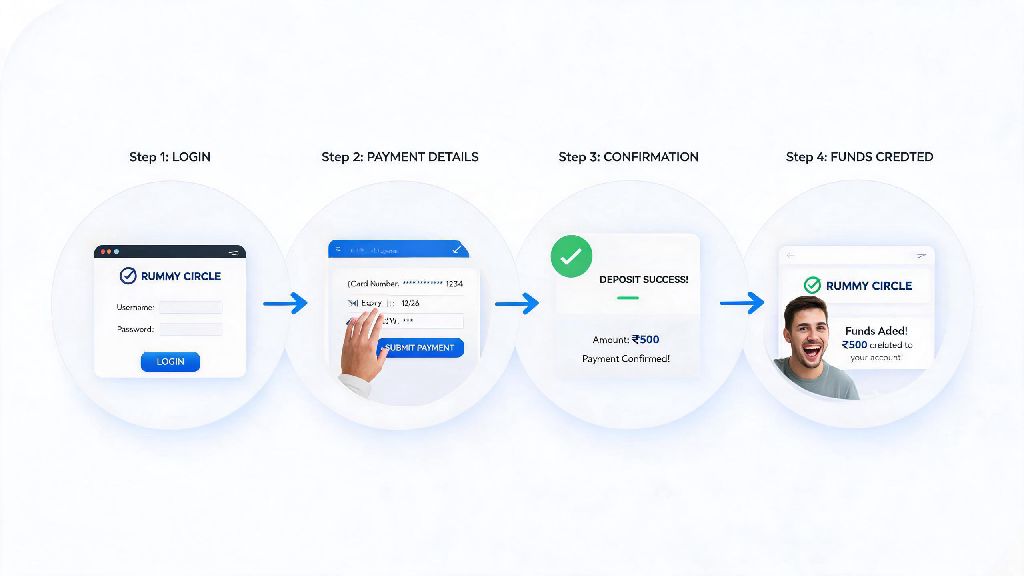
The process is far simpler than most new players expect, as long as you follow each step in order and don’t rush through the confirmation screens. First, open the official Rummy Circle app or website and log into your registered account. Always double-check that you’re logged into your verified account before initiating any deposit — I’ve had people reach out to me saying their deposit didn’t show up, and 9 times out of 10 it’s because they were logged into a secondary account they made with an old phone number.
Next, tap the “Add Cash” button usually located at the top right corner of the home screen. You’ll see a list of pre-set deposit amounts, or you can enter a custom amount that fits your budget. Remember that minimum deposit amounts start at ₹100 for most accounts, and maximum limits depend on your KYC verification level. If you have a welcome bonus or promotional code, enter it in the designated box before moving to the next step, or you’ll lose access to that extra credit.
Choose your preferred payment method from the available options, then follow the on-screen prompts to complete the transaction. Once the payment is confirmed, you’ll get a pop-up notification and an SMS alert, and the funds will reflect in your Rummy Circle wallet immediately. You can only use payment methods registered under your own name — if you use a friend’s UPI ID or card, the deposit may be rejected, and you could face delays getting your money refunded.
Accepted Payment Methods for Rummy Circle Deposits
Rummy Circle supports a wide range of payment options to cater to players across different regions and banking preferences. Each method has its own pros and cons, so you can pick the one that fits your deposit size and convenience best:
If your payment fails for any reason, don’t panic. The platform’s system automatically tracks failed transactions, and the amount will be refunded to your original payment source within 3-5 working days. You can check the status of your failed deposit in the “Transaction History” section of your account if you want to follow up. UPI is the most reliable option for deposits under ₹10,000 — I’ve used it for over 50 deposits and only had one failed transaction, which was refunded within 24 hours.
Tips to Avoid Common Deposit Issues on Rummy Circle
Most deposit problems happen because players skip small pre-checks before initiating their transaction, not because of platform errors. You must complete minimum KYC (PAN and mobile number verification) before you can make any deposit — you can’t even access the Add Cash section if you haven’t submitted your PAN details and verified your phone number with an OTP. Full KYC, which includes address proof, will unlock higher deposit limits and faster withdrawal processing later on, so it’s worth completing it as soon as you sign up.
If your transaction shows as “pending” after you’ve made the payment, don’t retry the deposit immediately. Wait for at least 10 minutes, as delays can happen if your bank’s server is slow or there’s a minor network issue. Retrying the same deposit multiple times can lead to double deductions, which will take longer to refund. I made this mistake once when my internet cut out mid-transaction, and I ended up with twice the amount I intended to deposit in my account, which was a hassle to sort out.
Also, make sure you’re aware of any minimum deposit requirements for promotional offers. For example, most welcome bonuses require a minimum deposit of ₹500 to unlock the 100% match, so if you only deposit ₹200, you won’t get the extra bonus funds. You can check the terms of any active offer in the “Promotions” section of your account before you make your deposit.
Security Best Practices for Rummy Circle Cash Deposits
Keeping your financial information safe is non-negotiable when you’re making any online transaction, including rummy deposits. The platform will never ask for your full card details or UPI PIN over call or chat — anyone who reaches out to you claiming to be from Rummy Circle support and asking for these details is a scammer. You should never share your account password or transaction OTP with anyone, even if they say they can help you unlock an exclusive bonus.
Only make deposits through the official Rummy Circle app or website. I’ve seen multiple scam messages floating around on social media and WhatsApp that claim to offer 200% deposit bonuses if you send money to a personal UPI ID. These are 100% fake, and Rummy Circle will never ask you to send funds to any personal account. All deposits go directly through the platform’s official encrypted payment gateway, so if you see any request that deviates from that, report it immediately to support.
It’s also a good idea to set monthly deposit limits for yourself in your account settings, even if you can afford to deposit more. This helps you stick to your budget and avoid overspending on casual games. Responsible gaming is a core part of the platform’s policies, and you can adjust these limits at any time based on your preferences. If you ever feel like you’re spending too much, you can also opt for a temporary or permanent self-exclusion from the platform directly through your account settings.
At the end of the day, learning how to add cash in rummy circle is a straightforward process as long as you follow the steps and stick to the best practices we’ve covered. You don’t need any special technical skills, and most transactions go through without a hitch if you’ve completed your KYC and use a supported payment method. Take the time to double-check all details before you confirm your deposit, and you’ll be able to jump into your favorite cash rummy games or tournaments in no time. Remember to always play responsibly, and only deposit amounts you’re comfortable losing, even if you’re confident in your rummy skills.