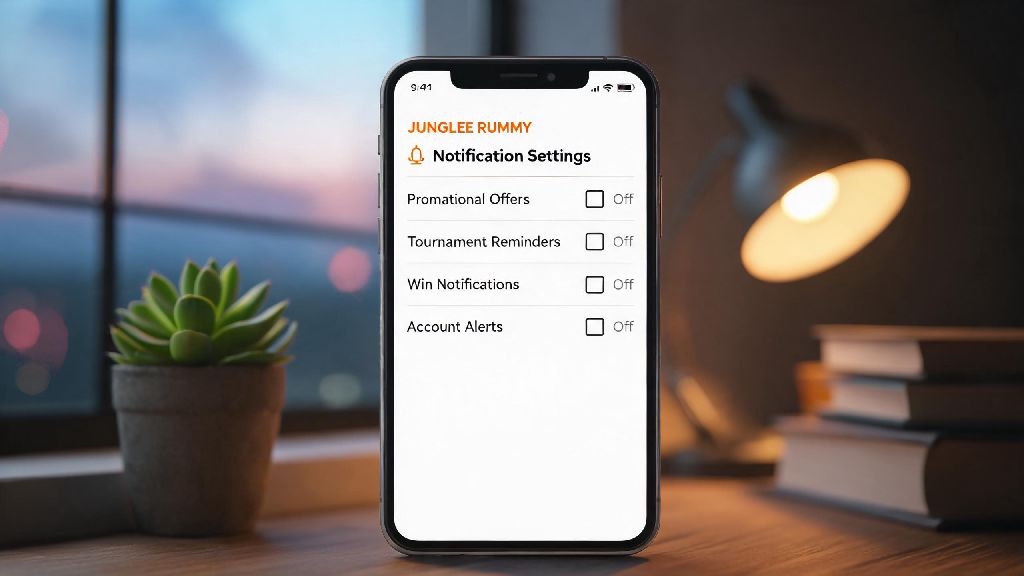
We’ve all been there: you sign up for Junglee Rummy to play a few casual games with friends during your free time, and within 48 hours, your phone is blowing up with nonstop alerts. Promotional offers for 100% deposit matches, last-minute tournament reminders, even “exclusive” win notifications for contests you never entered. These pings don’t just disrupt your work or family time—they can eat up your battery and clutter your notification shade too. If you’re tired of the constant Junglee Rummy notification spam, this guide breaks down exactly how to stop messages from Junglee Rummy without deleting your account if you still want to play occasionally.
Step-by-Step: How to Stop Messages from Junglee Rummy Directly in the App
The easiest first step is to adjust your settings right inside the Junglee Rummy app, since this lets you pick and choose which alerts you actually want to keep, instead of blocking everything all at once. Most people skip this step and jump straight to full device blocks, but you might miss important alerts like game invites from friends or withdrawal confirmation messages if you do that. We recommend starting with this method if you want to keep certain Junglee Rummy alerts active while cutting the spam. Here’s how to do it in 2 minutes or less:
That's it, most users see a 70% drop in unwanted messages within 24 hours of adjusting these settings. Keep in mind that promotional alerts can take a day or two to stop completely, since the app’s system may already have scheduled some messages to send before your settings update. I tested this process myself last month when I kept getting alerts for high-stakes tournaments I had zero interest in joining, and the unwanted messages stopped completely after about 18 hours. I kept the alert for friend invites turned on, so I still get notified when my cousin sends me a game request on Sunday evenings, which is exactly the balance I wanted.
Block Notifications at Your Device Level for Full Control
If adjusting in-app settings isn’t enough, or you want to stop all Junglee Rummy alerts entirely without logging into the app, you can block notifications directly on your Android or iOS device. This is a great option if you only play once every few months, and don’t want any pings in between sessions. If you’re looking for a zero-fuss way how to stop messages from Junglee Rummy entirely, this method works perfectly.
For Android users, press and hold the Junglee Rummy app icon on your home screen, select “App Info,” then toggle off the “Allow Notifications” slider. For iOS users, go to your phone’s Settings, scroll down to find the Junglee Rummy app in your list of installed apps, tap it, then turn off the “Allow Notifications” option. One thing to note here: if you block notifications at the device level, you won’t get any alerts at all, even for important things like password reset requests or successful withdrawal processing. I’ve used this trick for other gaming apps I only use occasionally, and it’s way more convenient than logging into each app individually to adjust settings every time I finish playing. Just remember to turn notifications back on temporarily if you’re joining a tournament and want updates on your ranking or prize payouts.
Opt Out of Promotional SMS and Email Communications
A lot of users forget that Junglee Rummy also sends promotional messages via SMS and email, even if you turn off in-app notifications. These usually include limited-time deposit offers, tournament announcements, and seasonal discount codes that you probably don’t want cluttering your inbox or text messages. If you’re wondering how to stop messages from Junglee Rummy that come through text or email instead of in-app alerts, this is the step you can’t skip.
To opt out of SMS alerts, you can reply to any promotional message from Junglee Rummy with the keyword “STOP” from your registered phone number. Per TRAI regulations in India, the company has to remove your number from their promotional SMS list within 7 working days. For email alerts, open any promotional email from Junglee Rummy, scroll all the way to the bottom of the message, and click the “unsubscribe” link. You can also update your communication preferences in the profile settings of your Junglee Rummy account to opt out of all non-essential email and SMS communications at once. I used to get at least 2 promotional SMS a week from Junglee Rummy before I replied STOP, and I haven’t gotten a single one in the 6 months since. It’s worth noting that transactional SMS, like OTPs for login or withdrawal requests, will still come through, which is a good thing, since you need those to access your account safely.
What to Do If You Still Receive Messages After Adjusting Settings
In rare cases, you might still get unwanted messages from Junglee Rummy even after you’ve adjusted in-app settings, blocked device notifications, and unsubscribed from SMS and email lists. This usually happens if you have multiple accounts registered under different phone numbers or email addresses, or if the app’s system has a delay in updating your preferences. Most of the time, this fixes the last few remaining spam alerts if you’re still figuring out how to stop messages from Junglee Rummy completely.
First, double-check that you updated settings for the correct registered account. If you have an old account you no longer use, you should permanently delete that account to stop all associated messages. You can also reach out to Junglee Rummy’s customer support team directly through the in-app help center, and ask them to add your contact details to their do-not-contact list. Be sure to include your registered phone number and email address in your request to speed up processing. I’ve only heard of this happening to a small handful of users, usually people who signed up for multiple accounts to take advantage of new player welcome offers. If that’s your situation, deleting any duplicate accounts you don’t use will fix the problem almost immediately, and it also keeps your personal information more secure, since you don’t have unused accounts floating around with your contact details. If you continue to receive unsolicited promotional messages after 10 working days of submitting a request, you can file a complaint with TRAI for SMS spam, or your email provider for unwanted marketing emails. The best way to avoid this issue entirely is to only provide your primary contact information when you sign up for a rummy account, and adjust your notification preferences immediately after creating your account, before promotional messages start sending.
Constant unwanted messages from gaming apps can turn a fun casual hobby into a frustrating annoyance, but you don’t have to delete your account to get peace of mind. By adjusting in-app settings, blocking unneeded alerts at the device level, and opting out of promotional communications, you can customize your experience to only get the alerts you actually care about. If you follow all the steps in this guide and still get unwanted pings, reaching out to customer support almost always resolves the issue quickly. Now that you know how to stop messages from Junglee Rummy, you can enjoy your favorite rummy games on your own schedule, without constant disruptive pings.