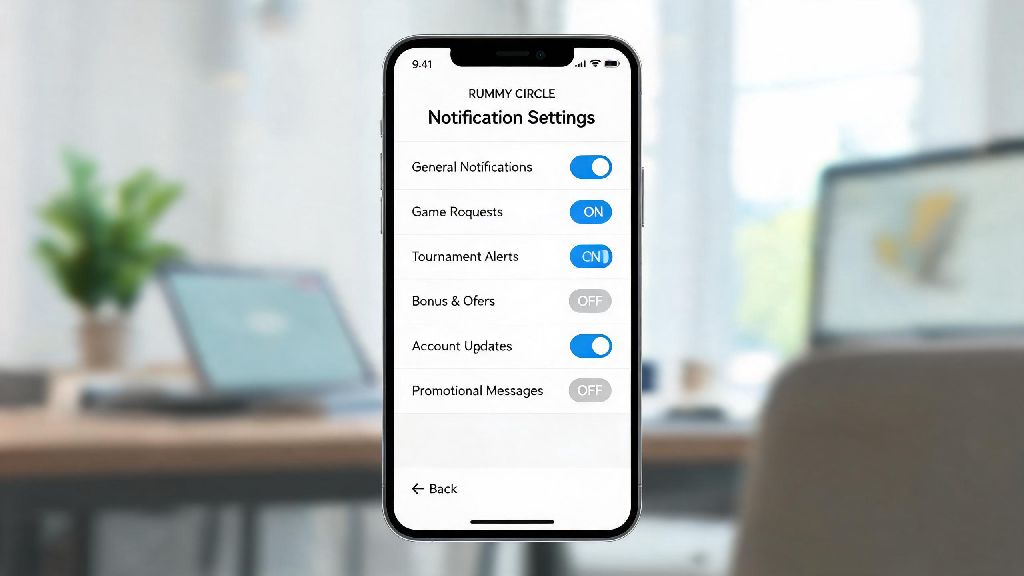
If you’ve ever played on Rummy Circle, you’ve probably dealt with the constant flood of alerts: reminders for random tournaments, pop-ups for bonus offers you don’t care about, and even text messages popping up when you’re in the middle of work or a family dinner. You don’t have to delete these messages one by one every day, either. Learning how to stop messages from Rummy Circle is a simple, no-cost fix that lets you take back control of your notifications, so you only get the alerts you actually want. This guide covers every method you can use, from quick in-app adjustments to permanent blocks, no technical skills required.
How to Stop Messages from Rummy Circle Using In-App Settings First
The first and easiest place to start is directly in the Rummy Circle app, because this lets you pick exactly which alerts you want to keep and which you want to turn off, instead of blocking everything all at once. Open the app, tap on your profile icon in the top right corner, then select “Settings” from the drop-down menu. Look for the “Notification Preferences” tab, and you’ll see separate toggles for in-app alerts, SMS messages, and promotional emails. You can uncheck boxes for things like casual tournament reminders, new bonus offers, and friend request alerts, while leaving critical alerts like withdrawal confirmations and paid tournament entry updates enabled. Always double check you’re only disabling the alerts you don’t need, so you don’t miss time-sensitive updates that affect your account balance or registered tournament slots.
It’s worth noting that some app updates may reset your notification preferences temporarily, so if you start getting alerts again after an update, just head back to the settings tab to re-adjust your choices. This method takes less than two minutes to complete, and it works for 80% of users who are tired of unnecessary messages.
Block Rummy Circle Spam Messages Directly on Your Mobile Device
If you already turned off promotional alerts in the app but are still getting random text messages from Rummy Circle or senders pretending to be the brand, you can block them directly through your phone’s messaging app. For Android users, long press on the message thread from the Rummy Circle sender, then tap “Block” or “Report Spam” depending on your device model. For iOS users, open the message, tap the sender’s contact icon at the top, select “Info”, then scroll down and tap “Block this Caller”. Marking these messages as spam also trains your phone’s built-in filter to catch similar messages before they hit your inbox in the future. Never reply to spam messages with “STOP” if the sender is a random 10-digit number instead of an official verified brand ID, as this tells scammers your number is active and can lead to even more spam.
It can be hard to tell official messages from scam ones at first glance, so keep these simple rules in mind:
If you get a message that violates these rules, block the sender immediately and report it to your mobile carrier if it includes scam requests for personal information.
Unsubscribe from Promotional Rummy Circle Emails in 2 Clicks
For most users, spam messages aren’t limited to text alerts — your email inbox is probably also cluttered with Rummy Circle offers for welcome bonuses, seasonal tournaments, and referral rewards. You don’t have to manually delete these every week, though. All official promotional emails from Rummy Circle are required by anti-spam laws to include a clear unsubscribe link at the very bottom of the message. Click that link, confirm your choice to opt out of marketing emails, and you’ll be removed from their mailing list within 72 hours.
If you still get promotional emails after that window, you can mark them as spam in your email client, which will automatically route future messages from that sender to your junk folder. Most email providers also let you set up custom filters to send any email with “Rummy Circle” in the subject line directly to trash if you don’t want to see any related messages at all. Never click links in unsolicited Rummy Circle emails that ask you to log in to claim a limited-time bonus, as these are almost always phishing attempts designed to steal your account login details.
What to Do If You Keep Receiving Unwanted Messages After Following All Steps
In rare cases, you might still get messages from Rummy Circle even after turning off in-app alerts, blocking senders, and unsubscribing from emails. This usually happens if you’ve deleted your account but your details are still stored in their old marketing database, or if third-party partners are sending messages on their behalf. First, reach out to Rummy Circle’s official customer support team through their in-app help center or official contact form, provide your registered mobile number and email address, and ask them to remove your information from all marketing and outreach lists. Most support teams resolve these requests within 3 to 5 business days.
If that doesn’t resolve the issue within a week, you can register your number on your country’s national Do Not Disturb (DND) registry, which blocks all promotional messages from registered brands across the board. DND registration is free, and it usually takes 15 to 30 days to take full effect, but it will stop almost all unsolicited promotional messages, not just those from Rummy Circle. If you receive threatening or fraudulent messages pretending to be from Rummy Circle, report them to your local telecom regulatory body immediately to protect yourself and other players from scams. Deleting your Rummy Circle account entirely will automatically stop all official messages from the brand, but make sure you withdraw all remaining funds from your account before you submit a deletion request.
You don’t have to put up with constant, annoying pings just because you enjoy playing rummy online once in a while. Whether you just want to cut down on distractions during the work week or you’ve stopped playing entirely and want to clear your inbox for good, learning how to stop messages from Rummy Circle is a quick, painless process that gives you full control over what lands in your text or email inbox. I’ve walked dozens of friends in my local rummy group through these steps over the last year, and almost all of them say they wish they’d taken five minutes to do it sooner instead of deleting dozens of spam messages a week. If you change your mind later and want to get alerts for big annual tournaments or exclusive offers for regular players, you can always adjust your notification settings back in a few clicks.